Monday, May 16, 2016

fdisk whole disk and really fresh install win 10

fdisk whole disk to only one partition

remove the OEM partition (win restore)

Then fdisk to two primary partitions

the first system partition will again appear automatically

now put first partition to be 59 Gb
fresh install win 7 pro 64 bit

continue install second partition x86 win 7

reason to use win 7 EFI boot menu

go back first partition
just install NIC drivers CD\LAN (Realtek auto detected)
also need to msconfig to boot from 64bit partition

Install Chrome
Install IE 11
(reboot and auto reboot again)

This time NO auto WINupdate


Yes this installation is faster and cleaner


so although there is a auto reboot once
(maybe next time dun need to update to IE 11)
or dun need to install Chrome

as dun the last page prompt
to close all windows program
to keep or not keep personal data
(I choose keep nothing)

This clean installation look ok

The intel driver also upgraded
and screen change to 1024

BTW after reboot
VIA need manually upgrade to VIA (win10) audio driver
but i decide to roll back and monitor

nothing I can do for the Realtek Gb NIC

So conclusion
free install from window 7 pro
only run network driver NIC from ECS motherboard CD
(next time download and put together with win7 iso DVD)

so bypass Windows 7 
display, VIA audio driver
(since last year write to VIA - their driver being updated
hope this will solve the problem 
although I am not using new windows 10 driver
but maybe I will do that next week)

and go for windows 10 drivers

or Simply there is a hidden time bomb
within the previous win 7 win 10 installation
that caused all the auto reboot sudden dealth

Anyway, have to monitor the situation again


Finally installation Genuine Windows 7 license key

After purchased Windows 7 license key from Dexnology on Qoo10

First is received a gmail and then a whatsapp from support
but was driving so ignore

When came back home at noon
download their OS image file
(2.5 G ISO and only within 5 min - very fast services)
I download both 64 and x86

I burn into a DVD setup disk

Initially want to just run winsetup but clean boot DVD
and format the HDD and  install their image

using their first email and key in the installation key

run the ECS motherboard CD to get NIC installed

panic once as windows 7 has prompt 3 days to get activated 
and network was just connected

whatsapp and email them
there is a delay but lucky there is reply after i nap a while

run the activation with second email from them

and that is so simple as even I can copy and paste key over

-------------

I boot from external WDC HDD with pre-installed windows 7
( this image is using HP OEM windows 7 


DVD)
this installation license has been expired during CNY

I take very long time to activate windows
(need double reboot and long wait as it is ext HDD and 
Microsoft take longer verification as why there is 
a license update from same PC (different HDD)
but luckily I managed to activate another HDD onto same PC)

Although also prove that I dun need their image
and so this license key I can use for any other windows 7 image
as long it is the same PC

Too bad I have no other PC to test if I can reuse this license

PS: both license is done via activation option
and not changing product key option
under my computer>properties>windows activation

summary

For 48 SGD it is ok to get a copy of OEM Microsoft windows 7 pro
license key

This business model is workable

Let review this after 180 days or one year later

I will install this license onto
1) Thumb drive
2) another PC
3) into another partition and upgrade to Windows 10
4) upgrade to 8.1 (maybe dun need)
5) run with Remix OS
6) another ext HDD with 64 bit version (maybe dun need)

PS:
0) I will need to Acronics this installation into a image
so that I can do disk recovery and faster installation

Sunday, December 06, 2015

Simplest way to view Windows 10 product-license-key-ID

Option Explicit

Dim objshell,path,DigitalID, Result
Set objshell = CreateObject("WScript.Shell")
'Set registry key path
Path = "HKLM\SOFTWARE\Microsoft\Windows NT\CurrentVersion\"
'Registry key value
DigitalID = objshell.RegRead(Path & "DigitalProductId")
Dim ProductName,ProductID,ProductKey,ProductData
'Get ProductName, ProductID, ProductKey
ProductName = "Product Name: " & objshell.RegRead(Path & "ProductName")
ProductID = "Product ID: " & objshell.RegRead(Path & "ProductID")
ProductKey = "Installed Key: " & ConvertToKey(DigitalID)
ProductData = ProductName & vbNewLine & ProductID & vbNewLine & ProductKey
'Show messbox if save to a file
If vbYes = MsgBox(ProductData & vblf & vblf & "Save to a file?", vbYesNo + vbQuestion, "BackUp Windows Key Information") then
Save ProductData
End If

'Convert binary to chars
Function ConvertToKey(Key)
Const KeyOffset = 52
Dim isWin8, Maps, i, j, Current, KeyOutput, Last, keypart1, insert
'Check if OS is Windows 8
isWin8 = (Key(66) \ 6) And 1
Key(66) = (Key(66) And &HF7) Or ((isWin8 And 2) * 4)
i = 24
Maps = "BCDFGHJKMPQRTVWXY2346789"
Do
Current= 0
j = 14
Do
Current = Current* 256
Current = Key(j + KeyOffset) + Current
Key(j + KeyOffset) = (Current \ 24)
Current=Current Mod 24
j = j -1
Loop While j >= 0
i = i -1
KeyOutput = Mid(Maps,Current+ 1, 1) & KeyOutput
Last = Current
Loop While i >= 0
keypart1 = Mid(KeyOutput, 2, Last)
insert = "N"
KeyOutput = Replace(KeyOutput, keypart1, keypart1 & insert, 2, 1, 0)
If Last = 0 Then KeyOutput = insert & KeyOutput
ConvertToKey = Mid(KeyOutput, 1, 5) & "-" & Mid(KeyOutput, 6, 5) & "-" & Mid(KeyOutput, 11, 5) & "-" & Mid(KeyOutput, 16, 5) & "-" & Mid(KeyOutput, 21, 5)


End Function
'Save data to a file
Function Save(Data)
Dim fso, fName, txt,objshell,UserName
Set objshell = CreateObject("wscript.shell")
'Get current user name
UserName = objshell.ExpandEnvironmentStrings("%UserName%")
'Create a text file on desktop
fName = "C:\Users\" & UserName & "\Desktop\WindowsKeyInfo.txt"
Set fso = CreateObject("Scripting.FileSystemObject")
Set txt = fso.CreateTextFile(fName)
txt.Writeline Data
txt.Close
End Function
I like this simple vbs program and also on bonus tips
to save the text file as vbs

but too bad can not attach vbs 


How to view your product key in Windows 10, Windows 8 and Windows 7

If you lost or forgot where you had stored your Windows product key, I have a solution for you. Today we will see how a simple VBS script can be used to show us the product key of an installed copy of Windows 10, Windows 8 or Windows 7. It is a simple solution to extract your product key from the OS installed on your PC without using any third party software. Here we go.

Actually, earlier I posted a similar solution which used PowerShell. but many users complained that it fails for them. PowerShell might require additional user skills and extra tweaks to run unsigned cmdlets.
Compared to PowerShell, this VBScript solution is almost perfect. All you need to do is to just click the file. To view your Windows 10 product key
  1. Open Notepad.
  2. Copy and paste the following text into the Notepad window
    Option Explicit     Dim objshell,path,DigitalID, Result   Set objshell = CreateObject("WScript.Shell")  'Set registry key path  Path = "HKLM\SOFTWARE\Microsoft\Windows NT\CurrentVersion\"  'Registry key value  DigitalID = objshell.RegRead(Path & "DigitalProductId")  Dim ProductName,ProductID,ProductKey,ProductData  'Get ProductName, ProductID, ProductKey  ProductName = "Product Name: " & objshell.RegRead(Path & "ProductName")  ProductID = "Product ID: " & objshell.RegRead(Path & "ProductID")  ProductKey = "Installed Key: " & ConvertToKey(DigitalID)   ProductData = ProductName  & vbNewLine & ProductID  & vbNewLine & ProductKey  'Show messbox if save to a file   If vbYes = MsgBox(ProductData  & vblf & vblf & "Save to a file?", vbYesNo + vbQuestion, "BackUp Windows Key Information") then     Save ProductData   End If        'Convert binary to chars  Function ConvertToKey(Key)      Const KeyOffset = 52      Dim isWin8, Maps, i, j, Current, KeyOutput, Last, keypart1, insert      'Check if OS is Windows 8      isWin8 = (Key(66) \ 6) And 1      Key(66) = (Key(66) And &HF7) Or ((isWin8 And 2) * 4)      i = 24      Maps = "BCDFGHJKMPQRTVWXY2346789"      Do          Current= 0          j = 14          Do             Current = Current* 256             Current = Key(j + KeyOffset) + Current             Key(j + KeyOffset) = (Current \ 24)             Current=Current Mod 24              j = j -1          Loop While j >= 0          i = i -1          KeyOutput = Mid(Maps,Current+ 1, 1) & KeyOutput          Last = Current      Loop While i >= 0       keypart1 = Mid(KeyOutput, 2, Last)      insert = "N"      KeyOutput = Replace(KeyOutput, keypart1, keypart1 & insert, 2, 1, 0)      If Last = 0 Then KeyOutput = insert & KeyOutput      ConvertToKey = Mid(KeyOutput, 1, 5) & "-" & Mid(KeyOutput, 6, 5) & "-" & Mid(KeyOutput, 11, 5) & "-" & Mid(KeyOutput, 16, 5) & "-" & Mid(KeyOutput, 21, 5)             End Function  'Save data to a file  Function Save(Data)      Dim fso, fName, txt,objshell,UserName      Set objshell = CreateObject("wscript.shell")      'Get current user name       UserName = objshell.ExpandEnvironmentStrings("%UserName%")       'Create a text file on desktop       fName = "C:\Users\" & UserName & "\Desktop\WindowsKeyInfo.txt"      Set fso = CreateObject("Scripting.FileSystemObject")      Set txt = fso.CreateTextFile(fName)      txt.Writeline Data      txt.Close  End Function
  3. Save the text above to a file with the ".vbs" extension on the Desktop.
    Bonus tip: To make sure that you saving the file correctly with the ".vbs" extension, you can type its name enclosed in double quotes, for example, "BackupWindowsKey.vbs".
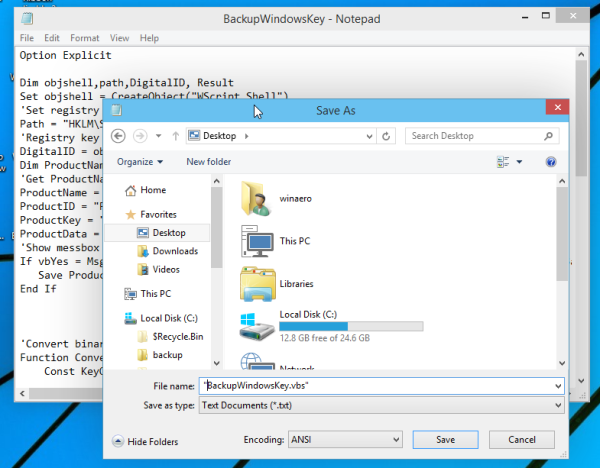
    backup windows product key Windows 10
  4. Now open your BackupWindowsKey.vbs file
  5. Voila, you product key is displayed on the screen!
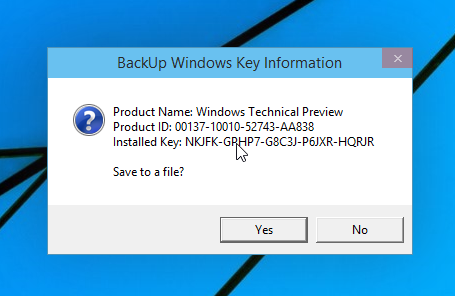
    show Windows 10 product key
I tested this trick on Windows 7, Windows 8 and Windows 10. It works flawlessly in all mentioned operating systems.

Saturday, December 05, 2015

SuperSU on Remix

the new SuperSU
is put under the setting menu

there is printing menu too


Android OS - Zygote, Dalvik VM to Android_Runtime

below lot of concept - only heard but never understand well

Android OS - Processes and the first init process Zygote

This is first lesson on Android
But most of time it is running in the background
as 


and I look into

Dalvik is a discontinued[1] process virtual machine (VM) in Google's Android operating system in Android 4.4

 In the next major Android release, Android 5.0 "Lollipop", Dalvik was entirely replaced by ART.[8]

So I am ignorance as I every time still clear the Dalvik Cache


Lollipop did not totally abandon dalvik cache. All it did it is to write pre compiled files to dalvik folder when installing while back in KitKat the system did not compile apps during installation but compile them just before them run (JIT). If you somehow delete/cleared all/some cached dalvik files in lollipop, system will try to re-compile the corresponding app so that you don't have to compile before they run.

Whenever an app updates via google play system compiles it during installation. However, when apps are updated via system update (Odin, ZIP flashing, OTA,you name it) , system will recompile the new apps which is why the first boot of lollipop takes so much time ( It is compiling all upgraded app!!).

Because TiBackup does not compile apps when restoring them, when you try to run the restored app, lollipop will try to find the pre-compiled file under dalvik cache directory but the correct one is not there. Therefore the app will not run properly. This is why after TiBackup restore in lollipop, always clear dalvik cache and cache and reboot. The restored app will be compiled correctly after during rebooting~ The same applies to Zip/Odin flashing too.

install forest-LP kernel then ROM Remix later on N7000

after install root version 2.4

then found this

and finally got the kernel file (see below note and attachment)

then I run the CWM
and then 
run the Philz

then I run the kernel

then run remix

(the process freeze at detected ext4 ...)

but it run long to have the ROM

then press any key to continue

(philz is touch screen and actually dun need the Android 5 type buttons)

but forgot to run Gapps

so re-run second time remix 
and use the TK pico 

also forgot to use philz clean to install a new ROM

but i wipe cache and Dalvik/ART Cache

philz is cwm-non-touch-6.0.1.4-i9100 ?

the upgrading up to 90 files

Too bad Gapps still giving problem

Third try I use gapps-lp-20141109-signed.zip
but it seem to be for Android 5.0 only

anyway, I even clear the cache and davike again

so take out battery
and going to recovery

install super SU 3.1.3

then install remix
and TK gapps

now it is reduced to 85 upgrading

this time seem to be system fresh setup
but too bad wifi not good

so after login gmail and it stop at checking infor

so need to do another time tmr


PS:

E:\app N7000>dir
 Volume in drive E has no label.

 Directory of E:\app N7000

30/11/2015  10:32 PM    <DIR>          .
30/11/2015  10:32 PM    <DIR>          ..
30/11/2015  10:29 PM         1,891,956 cwm-non-touch-6.0.1.4-i9100.zip
30/11/2015  10:29 PM         1,440,776 Root_SuperSU.0.98-Busybox.1.20.2-signed.zip
30/11/2015  10:29 PM         1,440,718 Root_SuperSU.0.98.Only-signed.zip
30/11/2015  10:35 PM         1,358,054 recovery-clockwork-4.0.1.5-galaxys2.zip
30/11/2015  10:35 PM           883,259 Root_Busybox_1.20.2_Only_(No_SuperSU)-S2-Update3-signed.zip
30/11/2015  10:35 PM         2,078,648 Root_Superuser_3.1.3_Busybox_1.20.2-Update1-signed.zip
30/11/2015  11:41 PM       249,088,035 cm-Resurrection_Remix_LP_v5.4.3-20150428-n7000.zip
01/01/2000  12:33 AM             2,798 tk_gapps_log.txt
30/11/2015  11:42 PM       162,927,577 gapps-lp-20141109-signed.zip
15/11/2015  08:26 PM       114,947,323 tk_gapps-modular-pico-5.1.1-20150920-signed.zip
15/11/2015  05:49 PM       216,663,841 Resurrection-Remix-LP-v5.5.8-20151019-jfltexx.zip
01/12/2015  09:52 PM         6,704,381 Forest-LP-Kernel-V5.zip
01/01/2000  12:33 AM            52,683 tk_gapps_debug_logs.tar.gz
07/03/2015  09:34 PM            24,332 AnReboot-net.londatiga.android.anreboot-5-v1.3.apk
              14 File(s)    759,504,381 bytes
               2 Dir(s)  13,870,071,808 bytes free


E:\app N7000>dir/w
 Volume in drive E has no label.

 Directory of E:\app N7000

[.]
[..]
cwm-non-touch-6.0.1.4-i9100.zip
Root_SuperSU.0.98-Busybox.1.20.2-signed.zip
Root_SuperSU.0.98.Only-signed.zip
recovery-clockwork-4.0.1.5-galaxys2.zip
Root_Busybox_1.20.2_Only_(No_SuperSU)-S2-Update3-signed.zip
Root_Superuser_3.1.3_Busybox_1.20.2-Update1-signed.zip
cm-Resurrection_Remix_LP_v5.4.3-20150428-n7000.zip
tk_gapps_log.txt
gapps-lp-20141109-signed.zip
tk_gapps-modular-pico-5.1.1-20150920-signed.zip
Resurrection-Remix-LP-v5.5.8-20151019-jfltexx.zip
Forest-LP-Kernel-V5.zip
tk_gapps_debug_logs.tar.gz
AnReboot-net.londatiga.android.anreboot-5-v1.3.apk
              14 File(s)    759,504,381 bytes
               2 Dir(s)  13,870,071,808 bytes free

Windows 10 autologin

after format and fresh installation

during installation i by pass email
and choose enter local username but leave password blank

this create auto login


but I try to get office again
so has to login via hotmail
but find to key in password very troublesome

(so referral to Windows 7 autologin process)

so to get back auto login

i use new settings/
Accounts
Your Accounts


similarly, to set google chrome as default broswer
as in below


install five copies of free office

After using a new email (not only hotmail) to get new office 365
later I reinstall (fresh install)  windows 10

after that I cant do another office install except

to goto


and login on same email


and then I was able to use office 363 online


but anyone able to do via better way to install offline (standalone)
copy of Microsoft Office (other than using new email ID)
do let me know

PS: the other alternative is Kingsoft office


and using Google doc


onhax window 10 copy need not activate